
Setting up a group to take the Compass
The Compass is most powerful when it is taken by a group, such as the members of a health department or the people involved in a multisector community collaboration addressing population health. The different perspectives brought by each individual help to identify opportunities for the group to work more effectively and adopt new practices to achieve equity goals.
Steps to launch the Compass with your group
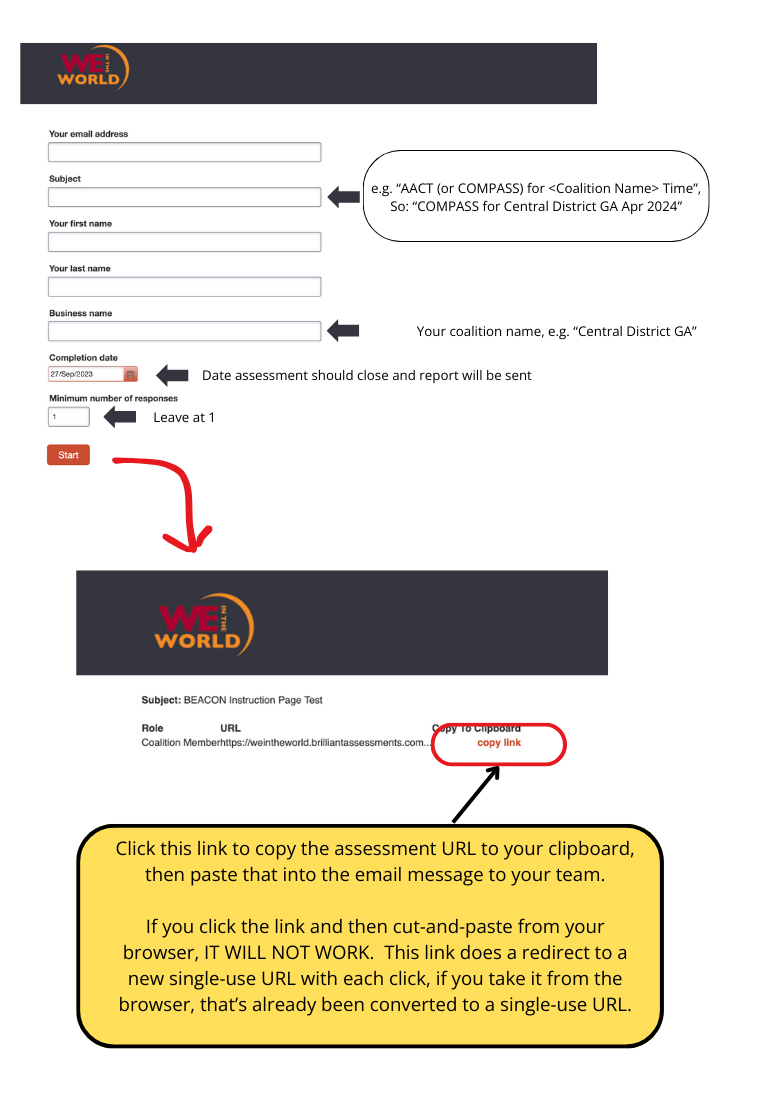
Only one person, the group leader, needs to follow these steps. The rest of the group members will get a link that will take them directly to the assessment for their group, and their results will be automatically associated with the group. After the assessment window closes (typically 2 weeks); the group leader will receive a report summarizing the group’s responses which the leader can share with the rest of the group.
1. Select group members
Identify who in your health equity collaboration will take the assessment. This might include all members of your collaborative (if you have one), members of your steering committee or sub-committees, community partners, and/or community members, including people most affected by health inequities.
2. Create your group
3. Distribute invitations
You can distribute your invitation links via email, the department newsletter, the sign-on message on your computer system, etc. You will probably want to send 3 messages: on the day you set up the assessment; a reminder after one week that there is one week remaining; and a final reminder on day 11 that only a few days remain. (You may need to adapt the schedule for weekends.)
4. Schedule and conduct followup
After two weeks, you should receive a summary report showing the combined results of your group members. To learn more about the followup, visit the Act page..
Community Collaboration
Compass
Health Department
Compass